Sunday, 17 November 2013

function generator using op amp ic 741

 the circuit that which we can uses in different ways to produce signals. In this we are observing that there are two op-amps that are of ic741.
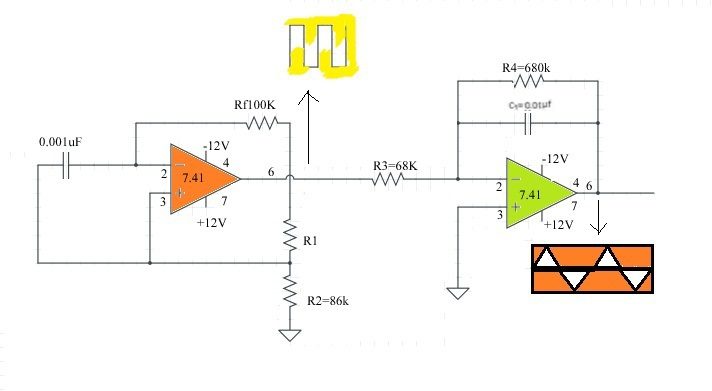
Function genering circuit using IC 741 op-amp
Signal generator which provide a variety of waveforms are referred to as unction generator. These are commonly available as test instruments. The variety of wave shapes provided generally determines the complexity and cost of the generator system. It facilitates such as voltage control of frequency and ability to provide a signal wave or group of wave.
Function generator system can be readily synthesized using operational amplifiers on approach which is use full when the need for a special purpose generator arises or when a function generator is inconvenient or prohibited by cost consideration.
The basic wave shapes produced by most function generators are square wave & triangular wave. These can be shaped by non linear amplifiers of other wave forms , including a sinusoidal waveforms.
The basic functions performed are as follows:
capacitor connected to orange colour(in fig) op-amp is while charging it used to generate fixe wave form periods and generate a square wave the left side circuit acts as a astable multi vibrator and the right side circuit acts as a integrator. As it is a astable multivibrator it generates signals with giving input and produces square wave.the square wave output  is given as input to the integrator circuit it will be converted to ramps or triangular by charge and discharges of the capacitor. In the same time by changing the values of capacitor we can change the amplitude of wave and also by varying resistance we can change the frequency and time period up to required value.
NOTE
  1. we have to connect the pins in correct order.
  2. we did not increase the voltage rapidly that will cause ic damage

windows 8 short cut keys


50 Windows 8 Keyboard Shortcuts You Should Know.
Windows Key + D : Show Desktop
Windows Key + C : Open Charms Menu
Windows Key + F : Charms Menu – Search
Windows Key + H : Charms Menu – Share
Windows Key + K : Charms Menu – Devices
Windows Key + I : Charms Menu – Settings
Windows Key + Q : Search For Installed Apps
Windows Key + W : Search Settings
Windows Key + E : Launch Windows Explorer Window
Windows Key + L : Lock PC and go to lock screen
Windows Key + T : Cycle through icons on taskbar (press Enter to launch app)
Windows Key + X : Show Advanced Windows Settings Menu
Windows Key + E : Launch Windows Explorer Window
Windows Key + M : Minimize all Windows
Windows Key + P : Choose secondary display modes
Windows Key + U : Open Ease of Access Center
Windows Key + Tab : Cycle through open Modern UI Apps
Windows Key + Shift + Tab : Cycle through open Modern UI Apps in reverse order
Windows Key + . : Snaps app to the right (split screen multitasking)
Windows Key + Shift + . : Snaps app to the left (split screen multitasking)
Windows Key + , : Temporarily view desktop
Alt + F4 : Quit Modern UI Apps
Windows Key + Page Up : Moves Start screen and apps to secondary monitor on the left
Windows Key + Page Down : Moves Start screen and apps to secondary monitor on the right
Windows Key + Shift + M : Restore all minimized Windows
Windows Key + R : Open Run dialog box
Windows Key + Up Arrow : Maximize current window
Windows Key + Down Arrow : Minimize current window
Windows Key + Left Arrow : Maximize current window to left side of the screen
Windows Key + Right Arrow : Maximize current window to right side of the screen
Ctrl + Shift + Escape : Open Task Manager
Windows Key + Print Screen : Takes a Print Screen and saves it to your Pictures folder
Windows Key + Pause Break : Display System Properties
Shift + Delete : Permanently delete files without sending it to Recycle Bin
Windows Key + F1 : Open Windows Help and Support
Windows Key + V : Cycle through notifications
Windows Key + Shift + V : Cycle through notifications in reverse order
Windows Key + 0 to 9 : Launch/show app pinned to taskbar at indicated number
Windows Key + Shift + 0 to 9 : Launch new instance of app pinned to taskbar at indicated number
Alt + Enter : Display Properties of selected item in File Explorer
Alt + Up Arrow : View upper level folder of current folder in File Explorer
Alt + Right Arrow : View next folder in File Explorer
Alt + Left Arrow : View previous folder in File Explorer
Alt + Print Screen : Print Screen focused Window only
Windows Key + Spacebar : Switch input language and keyboard layout
Windows Key + Shift + Spacebar : Switch to previous input language and keyboard layout
Windows Key + Enter : Open Narrator
Windows Key + + : Zoom in using Magnifier
Windows Key + - : Zoom out using Magnifier
Windows Key + Escape : Exit Magnifier


Tuesday, 5 November 2013

atl notice

all atl students are informed to attend to the atl projects section from today on wards after 4:30 pm  the sections will be going till the completion of the projects 

all members must attend this sections


regards  sharman sir
atl incharge

Thursday, 31 October 2013

digital communications questions for mid examination

1.companding explain briefly ,a law and u law companding techniques
2.pulse code modulation transmitter and receiver,show that differential pulse code modulation receiver is in the part of transmitter
3.signal to band width in pulse code modulation and obtain signal to quantization noise ratio of the pulse code modulation
4.principle of operation of binary phase shift keying generation and reception of binary phase shift keying and calculate band width


1.sampling theorem for low pass signal with equations
2.explain blocks of pulse code modulation  and also mention the advantages and disadvantages of pulse code modulation
3.signal to quantization noise ratio of delta modulation  and differences between granular noise and slow power noise (granular noise is also called as widenoise)
4.differential phase shift keying  generation and demodulation
 binary phase shift keying generation and demodulation


all of you prepare well for the examination

"all the best"

Thursday, 24 October 2013

emi questions for mid exam

1 af sine to square wave converter using diode cliping operation
2 diferent types of errors and their sourses, precautions to minimise them
3 explain harmonic distortion distortion
4 what is arbitrary waveform? arbitrary waveform generator working


1 simple circuit for frequency modulation of rf signal generator and explain
2 with neat sketch explain the operation of fundamental supresion
harmonic distortion analyser
3 what is wave analyser? frequency analyser and heterodyne wave analyser?
4 potentiometric voltmeter and differential voltmeter